
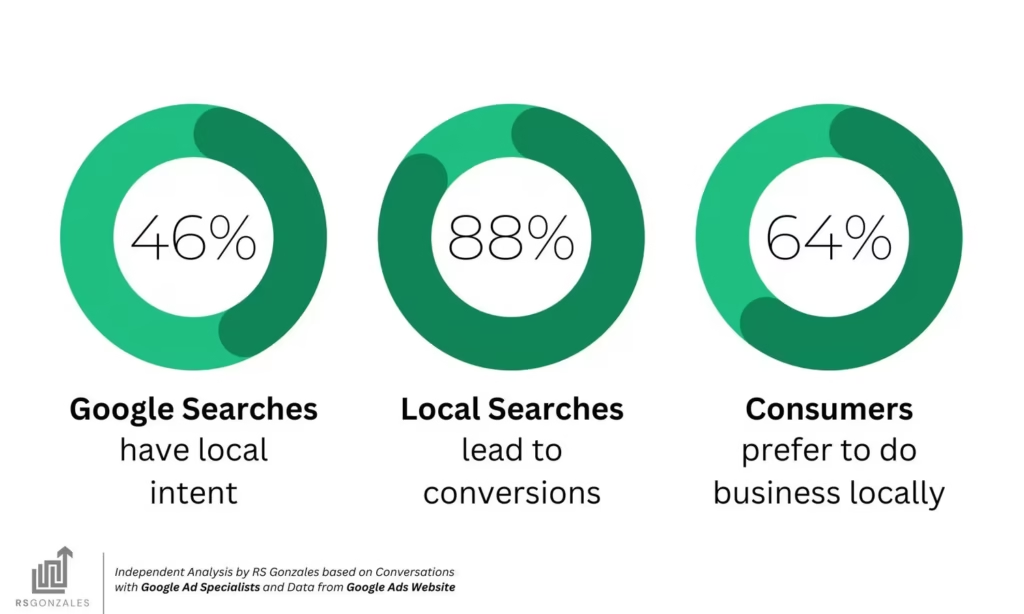
In today’s competitive local market, simply having a website is no longer enough. For roofing, remodeling, HVAC, plumbing, and home improvement companies, appearing in the Google Local Maps (Google 3-Pack) is one of the most effective ways to generate high-quality leads (CRM Tips). Businesses that rank in the top 3 positions on the map often receive 30–50% of all local clicks.
At DataDrivenHQ, we help contractors across the country use their CRM data strategically to improve local SEO performance and dominate Local Maps results. The secret isn’t just posting more reviews or running more ads — it’s using your CRM intelligently to send the right signals to Google.
This article reveals practical CRM tips that actually move the needle for Local Maps rankings in 2026.
Why Local Maps Ranking Matters for Contractors
The Google Local 3-Pack is prime real estate. When someone searches “roof repair near me” or “HVAC service Palm Springs,” the top three businesses shown on the map capture the majority of attention and calls.
Ranking higher in Local Maps typically leads to:
- More phone calls and form submissions
- Higher conversion rates than traditional website traffic
- Better brand visibility in your service area
- Increased trust through review volume and consistency
How Your CRM Directly Impacts Local Maps Rankings
Google looks at hundreds of signals when ranking local businesses. Many of the strongest signals can be influenced or strengthened through smart CRM usage:
- Consistent NAP (Name, Address, Phone) Data Your CRM should be the single source of truth for your business information. Inconsistent data across your website, Google Business Profile, directories, and CRM confuses Google’s algorithm.
- Review Generation & Management Google heavily favors businesses with fresh, relevant, and high-volume reviews. A good CRM helps you systematically ask for reviews after every job.
- Service Area Accuracy Properly configured service areas in your CRM help Google understand exactly where you provide service.
- Customer Engagement Signals Quick response times, follow-up interactions, and high customer satisfaction all send positive ranking signals.
7 Powerful CRM Tips to Boost Your Local Maps Rankings
1. Centralize Your Business Information in the CRM Make your CRM the master database for NAP information. Ensure every team member pulls contact details from the CRM rather than memory or old spreadsheets. Regularly audit and update this data.
2. Automate Review Requests After Every Job Set up automated workflows in your CRM that send review requests 24–48 hours after job completion. Personalized messages with direct links to Google get significantly higher response rates.
3. Track & Respond to Every Review Use your CRM to log every review and set reminders for your team to respond promptly (ideally within 24 hours). Google rewards businesses that actively engage with reviews.
4. Use Service Area Optimization Define precise service areas in your CRM and ensure this data matches your Google Business Profile. Include both cities and neighborhoods you genuinely serve.
5. Leverage Job Data for Content Creation Your CRM contains valuable data about completed projects. Use anonymized case studies and project photos to create location-specific content that strengthens local relevance.
6. Monitor Customer Satisfaction Scores Track Net Promoter Score (NPS) or Customer Satisfaction (CSAT) within your CRM. High satisfaction leads to better reviews and stronger ranking signals.
7. Integrate Call Tracking & Attribution Connect call tracking numbers to your CRM so you can see which marketing channels and keywords are driving the best leads. This data helps you optimize efforts toward what actually ranks and converts.
Advanced CRM Strategies for Local Maps Success
- Geo-tagging — Tag every job in your CRM with precise location data. This helps Google understand your real service footprint.
- Consistent Posting Schedule — Use CRM data to fuel regular Google Business Profile posts about recent local projects.
- Review Response Templates — Create professional, personalized response templates in your CRM for faster, consistent engagement.
Real Results from DataDrivenHQ Clients
After implementing these CRM strategies:
- One roofing company in Arizona moved from position 7 to position 2 in their primary service area within 90 days
- An HVAC contractor in California increased calls from Local Maps by 68% in six months
- A remodeling company doubled their review volume while maintaining a 4.9-star average
These improvements came primarily from better CRM processes rather than increased ad spend.
Common CRM Mistakes That Hurt Local Rankings
- Inconsistent business information across platforms
- Failing to respond to negative reviews
- Not requesting reviews systematically
- Poor data hygiene in the CRM
- Ignoring service area accuracy
How DataDrivenHQ Helps Contractors Win Local Maps
We don’t just provide a CRM — we help you use it as a powerful local SEO and marketing engine. Our platform is specifically built for home service businesses and includes:
- Built-in review automation
- Local ranking insights
- Service area optimization tools
- Seamless Google Business Profile integration
- Easy-to-understand dashboards for owners and marketing teams
Frequently Asked Questions
How long does it take to see improvement in Local Maps rankings? Most contractors see noticeable movement within 60–90 days when implementing consistent CRM strategies.
Do I need a lot of reviews to rank well? Quality and consistency matter more than sheer quantity, but businesses with 50+ recent reviews generally perform better.
Can a good CRM really impact Google rankings? Yes. Google uses behavioral signals, review velocity, and business consistency — all of which can be strengthened through proper CRM usage.
Is this only for large companies? No. Many of our best results come from 5–20 truck operations that want to grow profitably using data.
Start Using Your CRM to Dominate Local Maps
Stop treating your CRM as just a place to store customer data. When used strategically, it becomes one of your most powerful tools for improving local visibility and generating high-quality leads.
Ready to see what’s really possible with your CRM?
Email us at help@datadrivenhq.com or call +1 (442) 257-9401 today.
Visit DataDrivenHQ.com or connect with us on LinkedIn and Facebook for more contractor growth strategies.
Make your CRM work harder — and watch your Local Maps rankings climb.